
Logger
Summary
Section titled “Summary”This application view provides a simple interface for reading log entries, which is useful for debugging and monitoring the application’s behavior
Description
Section titled “Description”This UI control contains a simple header with the search box (1) and the clear button (2)
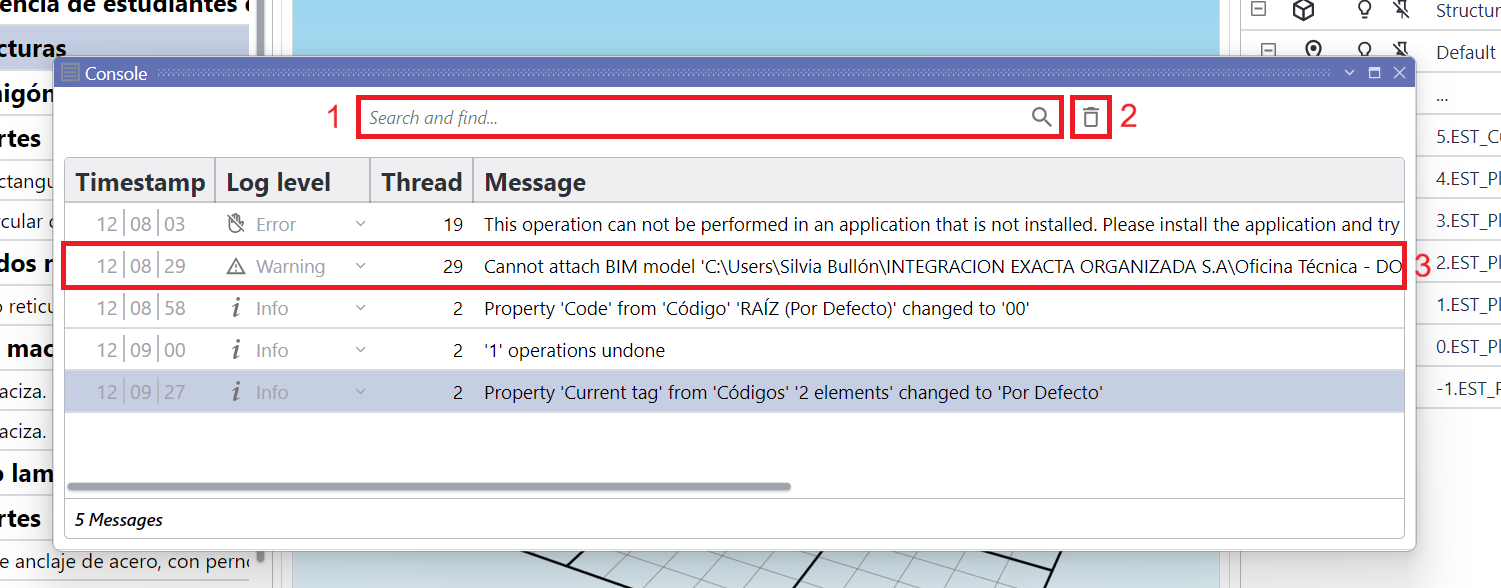
Logger application view in floating state
Each line (3) represents an event logged to a JSON-format text file located in %AppData%\BIMMATE\DASSIT\Logs, with the following format:
| Timestamp | Log level | Thread | Message |
|---|---|---|---|
| The time the message was logged | The severity of the message | The processor’s thread from whose message was sent | The content of the message |
You can locate any message in logger by typing a text in the search box (1), which will filter the messages to only those that contain the typed text. Clear messages (2) is also possible to help debugging next-process steps
Remember that the status bar holds several helpful buttons on the right, one of which is the last toast message shown  , which will likely match the last logged message
Consider sending log file to support for further assitance in case of error, prior to re-open DASSIT™ again, as only a single log file per day is generated
The action above can easily be done by accepting the error message that popups when application is closed due to an error, which will automatically send the log file to support
Context Menu
Section titled “Context Menu”The UI control does not contain a context menu