
Take-Offs Criteria
Summary
Section titled “Summary”This application view allows you to set up the available categories, and the take-offs criteria to measure BIM element by drag&droping them into a budget rule
Description
Section titled “Description”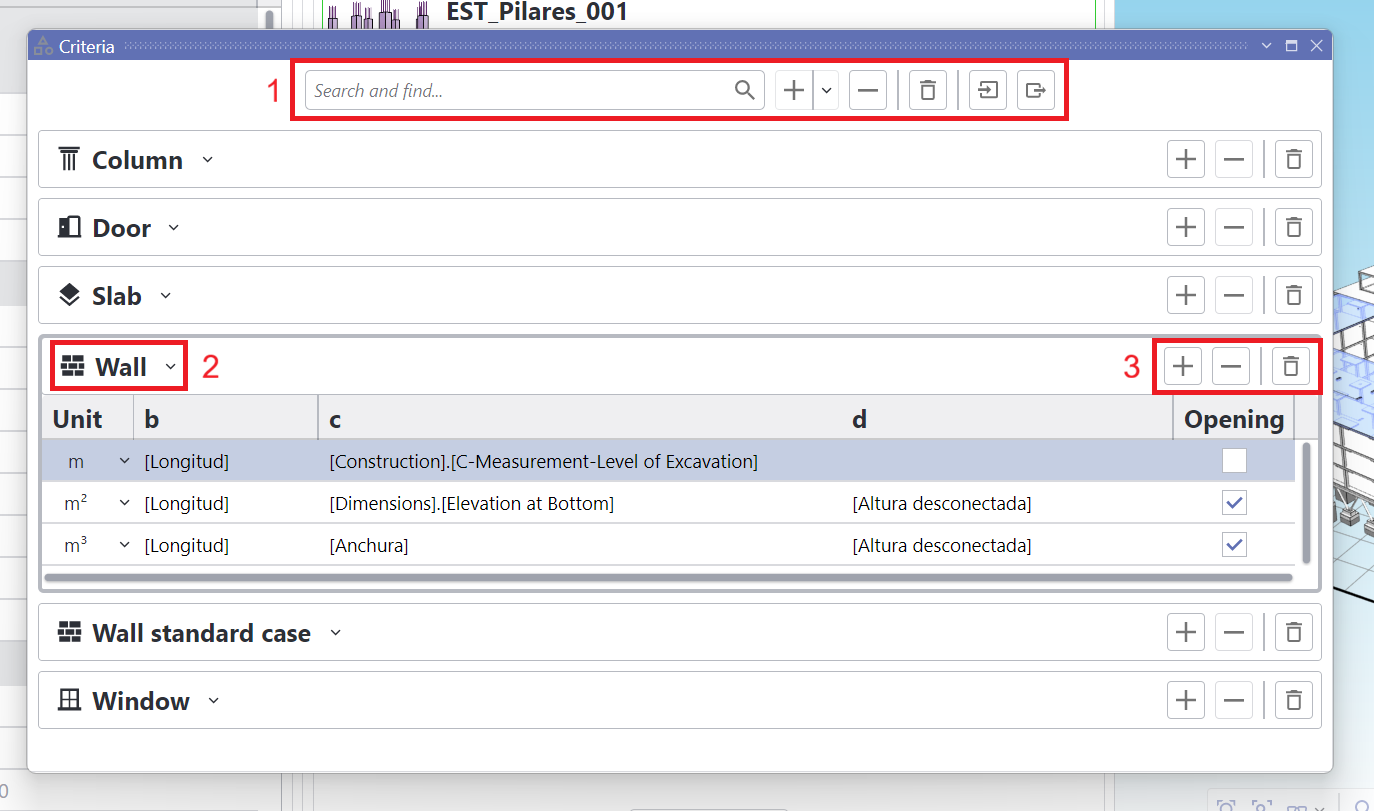
Take-offs criteria application view in floating state
The control shows a header (1) with several buttons followed by all the BIM categories ready to measure by drag&drop:
| Command | Icon | Action |
|---|---|---|
| Search box | Allows for quick filtering of content, useful when there are plenty of categories defined | |
| Add/Duplicate |  | Adds a new category or duplicates the selected one (if any) |
| Remove |  | Removes the selected category (disabled when none) |
| Clear |  | Deletes all categories |
| Import |  | Loads categories defined in any selected file, asking to override or skip if any match against existing |
| Export |  | Saves categories to a file for later use |
Each category, when selected, expands to show the available units that the BIM elements can be measured onto:
- The combo box (2) on the left of each header allows for changing the category
- On the right of the header, there are buttons (3) to add, remove and clear available units for that BIM category
Be aware that there cannot be duplicated categories
Notice that there cannot exist duplicated unit inside a category
Each unit inside a BIM category is to be defined by using these columns:
| Column | Required | Description |
|---|---|---|
| Unit | Yes | The unit of the budget item |
| a | No | A expression containing any BIM parameters, constants, math operators and functions |
| b | No | A expression containing any BIM parameters, constants, math operators and functions |
| c | No | A expression containing any BIM parameters, constants, math operators and functions |
| Openings | No | Indicates whether openings should be discount on take-offs |
Context Menu
Section titled “Context Menu”| Command | Icon | Action |
|---|---|---|
| Add | | Adds a new category |
| Duplicate |  | Duplicates the selected category (disabled if none) |
| Remove | | Removes the selected category (disabled if none) |
| Clear | | Deletes all categories |
| Import | | Loads categories defined in any selected file, asking to override or skip if any match against existing |
| Export | | Saves categories to a file for later use |