
HOME Tab
Summary
Section titled “Summary”This tab contains two types of items:
- Shorcuts for the recently open documents, so you can quickly continue working like on previous session
- Links for online video tutorials
Description
Section titled “Description”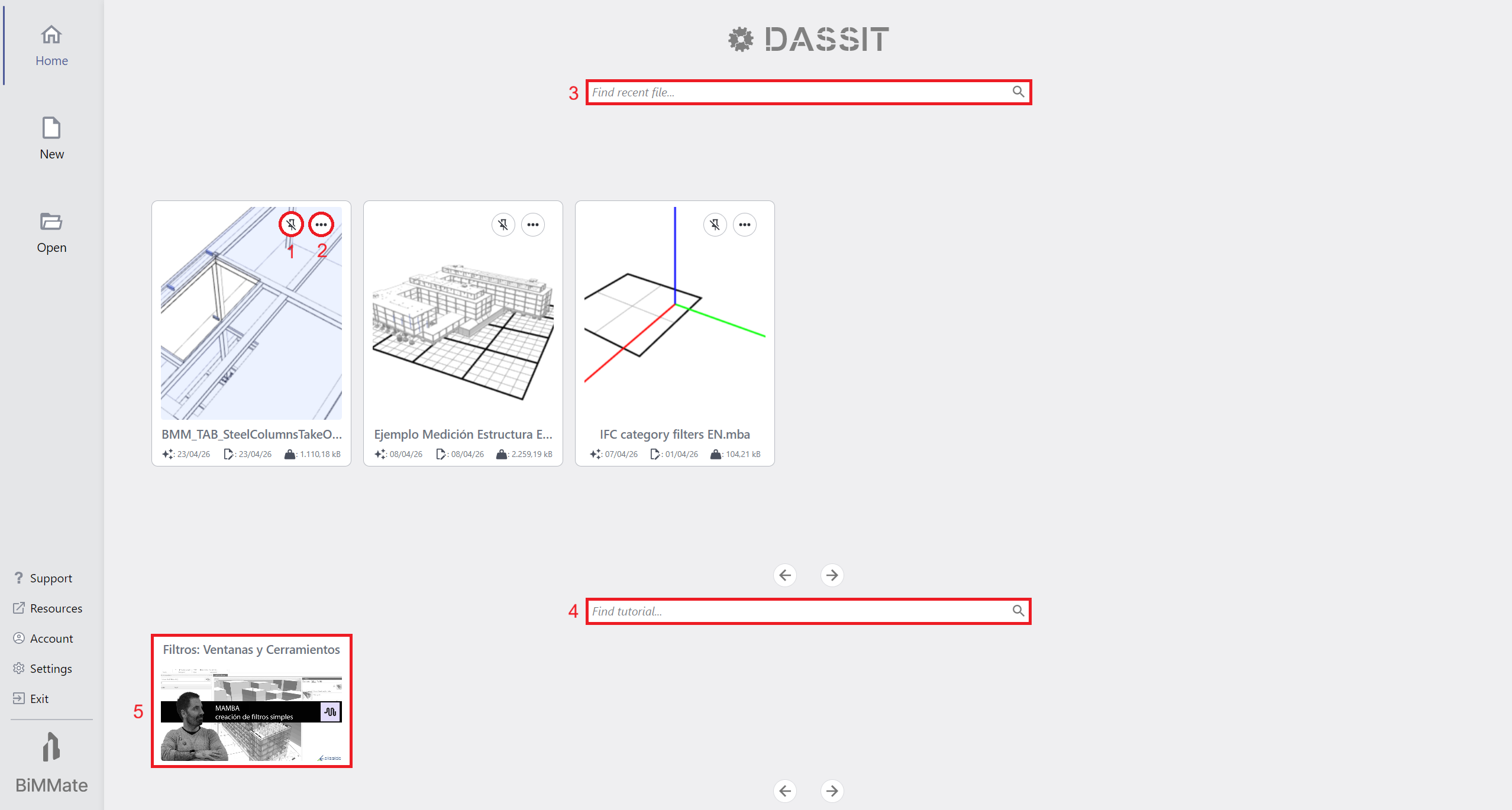
Backstage HOME Tab showing up recent documents and available tutorials
Recent documents
Section titled “Recent documents”Recent open documents are presented in cards format with:
- A pin button (1)
 to brig it to the first position in the list
 - A pop-up settings command (2)
 that allows you to:
- Open file in Operating System browser
- Remove document from collection (file will not be erased from its original location)
There is a search box (3) on the top where you can filter results
You can adjust the number of recent document shown in settings
Available tutorials
Section titled “Available tutorials”Below a search box (4) where you can filter results, there are online tutorials (5) that can help DASSIT™ newcomers learn basic workflows
These video-tutorials have been recorded by our academic partners
Context Menu
Section titled “Context Menu”The UI control does not contain a context menu