
Documents Docking System
Documents Docking system hold controls specific for each open document
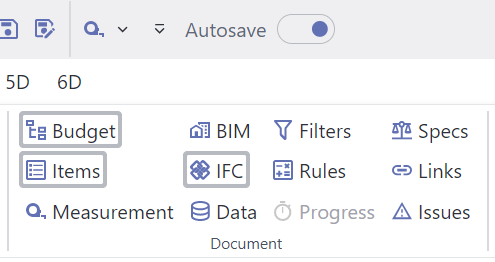
Ribbon's Layout Tab showing Documents available docking controls
Currently, DASSIT™ implements this UI’s controls in this docking system:
| UI Control | Description |
|---|---|
| Budget | Hierarchical DataGrid where you can view and edit budget-related information keeping the hierarchical dependencies |
| Budget Items | Flat DataGrid where you can view and edit budget-related information despite the hierarchical relationships |
| Measurement | Flat DataGrid where the you can view and edit take-offs for selected item in above controls |
| BIM | 3D control containing the scene with the BIM elements |
| IFC | Hierarchical DataGrid where you can view the BIM dependencies for all elements in every loaded model |
| Data | Flat DataGrid where you can view and edit other than economic data specification |
| Filters | UI control where you can add filters to the document |
| Rules | UI control where you can add rules to the document |
| Progress | Enterprise-Level tool not yet-available |
| Specs | Flat DataGrid where you can view and edit legal specification definitions |
| Links | Flat DataGrid where you can view and edit links to external resources |
| Issues | Flat DataGrid where you can manage issues in the current document |
Controls currently shown in DASSIT™ have a visible frame around
You can manage the visibility of all those UI controls for each open document