
Title Bar
Summary
Section titled “Summary”The title bar is the top UI control of the main view
Description
Section titled “Description”
Title Bar control showing up app logo, QAT and others
The title bar contains some useful elements such as:
- The DASSIT™ logo and name, that shows up the version number when hovering
- The Ribbon Quick Access Toolbar (QAT), that contains the most common commands for frequent actions
- The auto-save toggle button
- The general search bar that helps you find anything
- Some useful shortcuts on the right that can also be found in the Backstage
Quick Access Toolbar
Section titled “Quick Access Toolbar”This customizable control holds the most frequently used commands in the app
On the right, there is a drop-down that allows you to customize the commands displayed on it, but also has support for displaying the QAT above (default) or below ribbon menu
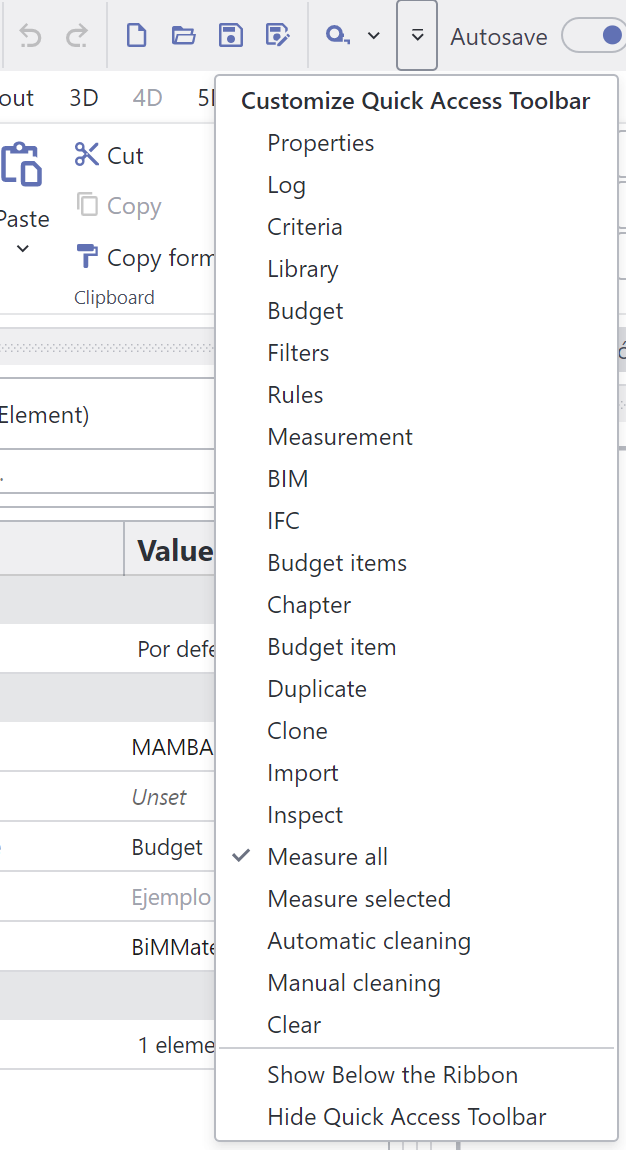
Quick Access Toolbar customization options
Autosave
Section titled “Autosave”Autosave toggle button is a handy control for switching on and off the auto-save feature
The auto-save interval can be set in the Backstage Settings Tab
Search Bar
Section titled “Search Bar”By typing anything there, you can quickly locate anything
Search is currently supporting BIM elements search by GUID (multiple searching is also available)
Shortcuts
Section titled “Shortcuts”On the right side of the title bar, there are shortcuts for commands that are also available in the Backstage, like:
- The resource links
 command
 - The light/dark theme toggle button
- The messages command

- The login/logout
command

Context Menu
Section titled “Context Menu”The UI control does not contain a context menu